
Last updated: November 19, 2026
Key Takeaways
- If any one of those changes, the workflow changes too.
- The right choice depends on fee size, speed, and control.
- Separate earning, collecting, saving, and spending into different steps and places.
- Invoice when work is approved or a milestone is delivered, and set terms based on leverage and risk.
Freelance income and payment operations get messy when invoices, tax set-asides, late payers, and platform fees all hit at once. Quick Answer: a workable starting point is a net-7 or net-14 invoice cycle, a 25% to 35% tax bucket, and a weekly invoice review. In the context of Freelance income and payment operations — The Complete Guide, this guide shows you what to do, in what order, and when the standard advice breaks.
What actually determines the right payment setup?
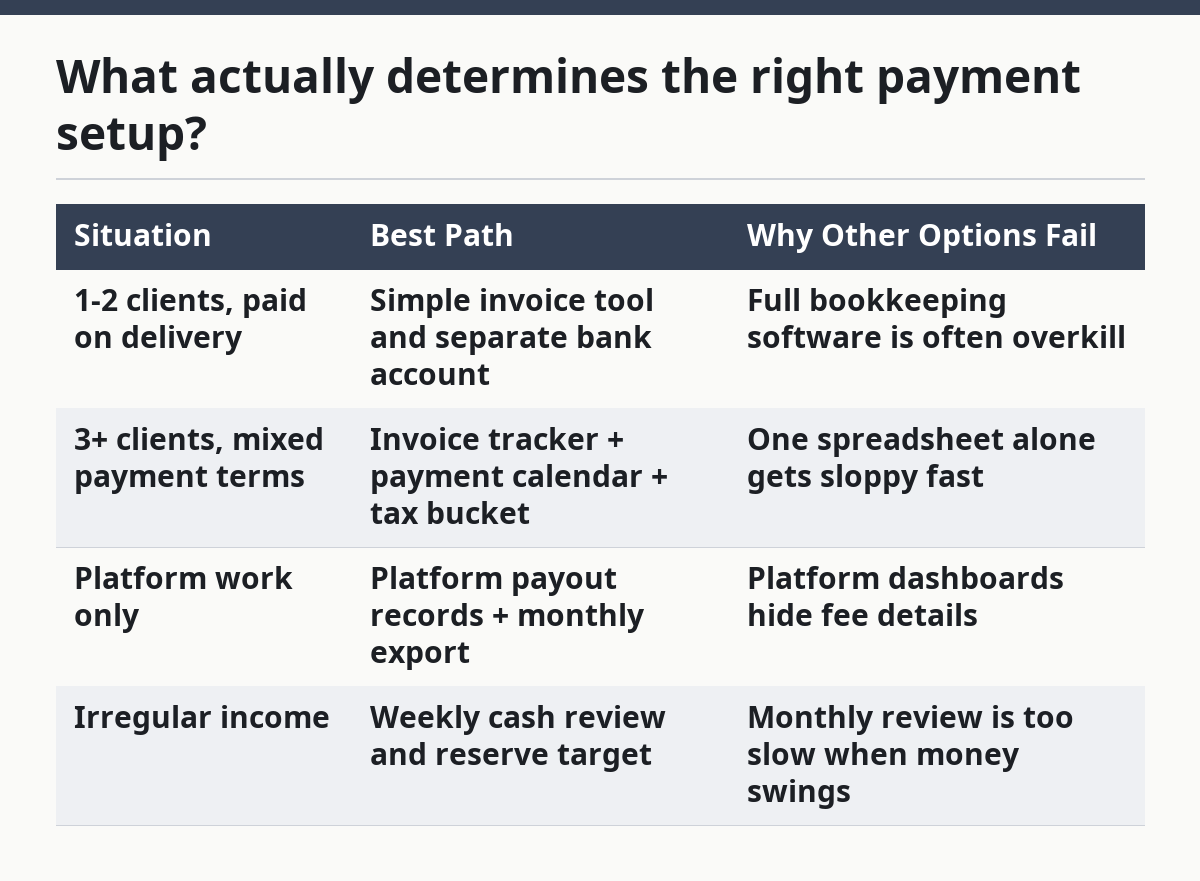
Your payment setup depends on four things: how often you get paid, how variable your income is, whether clients pay by invoice or platform, and how much cash you need to keep in reserve. If any one of those changes, the right workflow changes too.
Picture this: you have three active clients, one pays on a 30-day net term, one pays through Upwork, and one still wants to send a check. You need a system that handles all three without missing tax money or late invoices. That means the right answer is not “use one app and hope.” It’s a process with rules. The best setup is the one that fits your cash timing.
| Situation | Best Path | Why Other Options Fail |
|---|---|---|
| 1-2 clients, paid on delivery | Simple invoice tool and separate bank account | Full bookkeeping software is often overkill |
| 3+ clients, mixed payment terms | Invoice tracker + payment calendar + tax bucket | One spreadsheet alone gets sloppy fast |
| Platform work only | Platform payout records + monthly export | Platform dashboards hide fee details |
| Irregular income | Weekly cash review and reserve target | Monthly review is too slow when money swings |
If you’re early and only have a few invoices a month, a spreadsheet plus a payment app can be enough. If you’re sending 10 or more invoices a month, or you’re juggling wire transfers, card payments, and ACH, then a proper bookkeeping flow saves time and missed money. The truth is, the tool matters less than the order of operations.
Use this order:
- Send the invoice the same day the work is approved.
- Set one payment term and use it every time, such as net-7 or net-14.
- Record the invoice in the same place every time.
- Move tax money out the day cash lands.
- Check overdue invoices once a week.
- Reconcile deposits against invoices at least once a month.
That last step gets skipped all the time. Don’t skip it.
Quick check: If your cash comes in at uneven times, you need a reserve and a weekly invoice check, not just a prettier invoice template.
How should you get paid: bank transfer, card, PayPal, or platform payout?
Bank transfer is usually best for larger invoices, card payments are easiest for clients, PayPal is convenient but fee-heavy, and platform payouts are fine only when the platform already brings you the work. The right choice depends on fee size, speed, and how much control you want.
Picture this: a client says they can pay by ACH, credit card, or PayPal. You want the money fastest, but you also don’t want to give away 3% or more of the invoice if you don’t have to. In practice, the best payment rail is the one that preserves margin and clears on time. If the client is in the U.S., ACH is often cleaner for bigger invoices. If the client is overseas, Wise or Payoneer may be a better fit than a bank wire with a poor exchange rate.
Here’s the catch: convenience has a price. Card payments are easy for the client, but the processor fee can eat a real chunk of a small project. PayPal is simple, yet dispute rules and currency conversion can bite you. Upwork, Fiverr, and similar platforms can make collection easy, but the platform controls timing, holds, and sometimes the communication layer too.
For most freelancers, this is the practical rule:
- Offer bank transfer or ACH for invoices over a few hundred dollars.
- Keep card payments as a backup, not the default, unless your client base expects them.
- Use PayPal only when the client insists or the country mix makes it the cleanest route.
- Use platform payout tools if the platform found the lead and you accept the fee structure.
- Never leave “payment methods” vague in the contract.
A lot of freelancers miss the hidden cost: refund risk and currency conversion. If a client pays in one currency and your costs are in another, the exchange spread can be worse than the headline fee. Wise publishes transparent conversion pricing on its product pages, which makes it easier to compare than a bank quote that hides the spread. Stripe also publishes card processing fees by region, so check the current page before you set your terms.
Quick check: If the invoice is large or cross-border, you need a low-fee transfer method and a currency plan, not just “whatever’s easiest.”
How do you build a freelance income workflow that actually works?

You build it by separating earning, collecting, saving, and spending into different steps and different places. The point is to stop one late client from wrecking the rest of your month.
Picture this: money lands in your personal checking account, bills come out two days later, and you still haven’t set aside tax money. That’s how freelancers get trapped. The fix is a four-bucket flow: operating cash, tax cash, owner pay, and reserves. If you use one account for everything, you will keep guessing.
A clean workflow looks like this:
- Send a quote or proposal with payment terms attached.
- Turn the accepted scope into an invoice with a due date.
- Save the invoice in one tracker with client name, amount, due date, and status.
- Deposit payments into a dedicated business checking account.
- Move the tax share to a separate savings account the same day.
- Pay yourself on a schedule, not whenever you feel flush.
- Review your open invoices every Friday.
- Reconcile the month against bank records and payment processor reports.
You do not need a 12-tab monster spreadsheet for this. You need a short list of fields that you actually update. At minimum, track invoice number, client, date sent, due date, amount, fees, tax set-aside, date paid, and whether the work is complete. If you use QuickBooks, FreshBooks, Xero, or Wave, those fields already exist in some form.
A simple reserve rule helps too. If your income swings hard from month to month, keep at least one month of core expenses in cash before you grow spending. If you’re still building a client base, aim for more. That reserve is what lets you say no to bad work instead of taking it out of panic.
The mistake here is trying to “be organized” after the money has already landed. Too late. The system has to start before the invoice goes out.
Quick check: If you can’t answer “where is tax money right now?” in five seconds, your workflow is too loose.
When should you invoice, and what payment terms should you use?
You should invoice the moment the work is approved or the milestone is delivered, and your payment term should match your leverage, not your fear. If you can get net-7 or due on receipt, use it. If the client insists on net-30, price for the wait.
Picture this: you finish a project on Monday and wait until Friday to invoice because it “feels less pushy.” That delay pushes your cash back for no good reason. The fastest safe rule is to invoice on delivery rather than next week. The longer you wait, the longer your money sits in someone else’s queue.
Use terms this way:
- Due on receipt works best for small, low-risk projects.
- Net-7 is a strong default for many freelancers.
- Net-14 is still reasonable when a client has internal approval steps.
- Net-30 should come with higher prices or a long-term relationship.
- 50% upfront can make sense on larger custom projects or work with heavy discovery.
If you’re dealing with a new client, ask for a deposit. On a bigger project, a 50% deposit protects your time if the client disappears midstream. On retainers, invoice on a fixed day each month. That rhythm makes cash easier to predict.
Do not let “we pay on our schedule” become your schedule. If the client says invoices go through a payment portal with a 45-day cycle, bake that into the contract and the price. Slow payers cost you working capital. That cost is real even when nobody writes a fee line for it.
A clean invoice should include the client’s legal name, your legal name or entity name, the invoice number, issue date, due date, line items, total, accepted currency, payment instructions, and a late fee note if you actually plan to enforce one. If you never intend to charge a late fee, don’t bluff. Empty threats weaken the whole document.
Quick check: If you’re chasing money after work is done, your invoice timing is already too late.
What should you do about taxes, savings, and owner pay?
You should separate tax money first, then pay yourself, then spend what’s left. If you do it backward, the tax bill will force a scramble later.
Picture this: you look at your balance and think you’ve earned far more than you actually can spend. Taxes, fees, and unpaid receivables are all hiding in that number. The workable habit is to treat gross income as not-yours until the set-asides happen, but check the right tax rate with a qualified professional before you rely on any blanket percentage. That mindset saves more pain than any clever app.
A common freelancer rule is to move 25% to 35% of income into a tax savings bucket, but the exact number depends on your location, entity type, deductions, and income level. That’s why a tax pro matters if your situation is not simple. I’m not giving tax advice here; I’m giving a cash-handling rule. Keep the bucket separate until you know the real number.
Use this monthly sequence:
- Deposit client payments into the operating account.
- Move the tax share to savings the same day.
- Set aside a fee buffer if payment processors take a cut.
- Pay fixed costs like software, hosting, and software subscriptions.
- Transfer your own pay on one or two set dates.
- Leave a reserve untouched for surprises.
- Reconcile all transfers at month end.
If you’re in the U.S., IRS estimated tax rules may apply depending on your situation, and quarterly payments can matter. If you’re outside the U.S., local rules may differ a lot. The IRS website explains estimated tax basics, and HMRC or your local tax authority will have its own version if you’re abroad. If tax rules are unclear, ask a qualified professional. That is cheaper than fixing a mess.
The biggest mistake is paying yourself first and hoping tax money will “work out.” It won’t. If a client pays late or a project gets refunded, your cushion disappears fast. Owner pay should be a transfer, not a reaction.
Quick check: If you don’t already know your tax set-aside rate and your pay schedule, fix that before you raise your spending.
Which tools help, and which ones create extra work?
The right tools are the ones that reduce double entry, show overdue invoices fast, and let you export records at tax time. The wrong tools look nice but make reconciliation harder.
Picture this: you have an invoice in one app, payment notifications in another, and bank deposits somewhere else. That’s not a system; that’s three screens and a headache. Choose tools that share data cleanly or keep the stack tiny. If a tool cannot export clean CSV files, that’s a warning sign.
Some common tools:
- QuickBooks Online: strong for invoicing, bookkeeping, and bank sync.
- Xero: good for multi-currency needs and cleaner bookkeeping workflows.
- FreshBooks: friendly for service work and simple client billing.
- Wave: useful for basic invoicing and tracking on a lighter budget.
- Wise Business: helpful for cross-border payments and currency conversion.
- Stripe: useful when clients pay by card or bank debit through hosted checkout.
The table below shows how the trade-offs usually shake out.
| Tool Type | Best Use | Weak Spot | What to Watch |
|---|---|---|---|
| Bookkeeping suite | Full income tracking | Learning curve | Bank sync errors |
| Invoice-only app | Small client load | Weak reporting | Manual reconciliation |
| Payment processor | Fast collection | Fees and disputes | Currency spread |
| Cross-border transfer app | Global clients | Not all rails supported | Local payout timing |
If your workload is small, an invoice app plus a spreadsheet is enough. If you have multiple currencies, recurring retainers, or VAT/GST issues, a bookkeeping suite is usually worth it. If you’re spending hours every month cleaning up records, the cheap tool is already expensive.
Here’s the catch: tool choice can hide bad habits. A shiny dashboard does not fix late invoicing, missing contracts, or sloppy terms. The tool should support the process, not replace it.
Quick check: If your current stack forces you to copy the same number into three places, it’s time to simplify or upgrade.
What breaks the standard advice?
The standard advice breaks when your payment terms, client type, or country setup changes the cash flow math. In those cases, “just invoice faster” is weak advice.
Picture this: you’re told to use net-14, but a government contractor pays on a 60-day cycle and will not budge. Or you work across borders, and your client can only pay by wire transfer once a month. The normal rule flips when the client controls the rails. Then your pricing, reserve, and invoicing rhythm have to absorb the delay.
| Scenario | What Changes | What To Do Instead |
|---|---|---|
| Government or enterprise client | Slow approval and payment cycles | Price for 30- to 60-day cash lag |
| Cross-border work | FX fees and transfer delays | Quote in one currency and use one transfer method |
| Retainers | Predictable recurring work | Invoice on the same calendar day monthly |
| Project cancellations | Partial completion risk | Use deposits and milestone billing |
| Platform-only work | Platform timing rules | Track platform fees and payout dates separately |
If you’re dealing with retainers, the goal is predictability, not one-off invoice chasing. A monthly retainer should have one invoice date, one due date, and one service scope. If the scope shifts often, the retainer is really a project in disguise.
If you’re dealing with cross-border clients, watch out for the hidden drag of bank spreads and intermediary fees. A $1,000 invoice can arrive as less than you expected once conversion and transfer fees hit. Wise, Stripe, and PayPal all handle this differently, so compare the actual landed amount, not the headline fee.
If you’re working with larger companies, the issue may be procurement, not payment method. Their accounts payable team may need a vendor setup form, W-9 or W-8 forms, or PO numbers before they can pay. Get those documents early. Waiting until the invoice is due is a mistake.
Quick check: If your client has approval layers, currency conversion, or platform rules, standard freelance advice is too simple for your case.
Freelance income and payment operations: what does a weekly system look like?
A weekly system is best when your income is irregular and you want fewer surprises. It keeps small problems from turning into cash emergencies.
Picture this: Monday starts with one overdue invoice, Wednesday brings a payment, and Friday a client asks for an updated receipt. A weekly routine keeps all of that in view. The goal is a 30-minute money review every week, plus one deeper monthly close.
Use this weekly flow:
- Check all open invoices.
- Mark anything overdue.
- Send one follow-up email per overdue invoice.
- Confirm new deposits in the bank.
- Move tax money out of the deposit account.
- Update your cash forecast for the next 30 days.
- Note any invoices that need correction or reissue.
The monthly close is where you reconcile deposits, fees, refunds, and withdrawals. That’s the part many freelancers avoid because it feels dull. It’s also the part that tells you whether your pricing is actually working.
A simple cash forecast helps a lot. List expected invoices, expected due dates, fixed costs due in the next 30 days, and the reserve you refuse to touch. You do not need fancy finance software for that. A spreadsheet or a bookkeeping dashboard is enough if you keep it current.
The best part? Once this routine is in place, payment stress drops fast. You stop wondering whether money is missing. You can see what’s due, what’s late, and what’s already been set aside.
Quick check: If Friday is the first time you look at unpaid invoices, a weekly money review will help right away.
FAQ
How much should I set aside for taxes?
A practical starting point is 25% to 35% of freelance income, but your actual number depends on where you live, how your work is structured, and what deductions apply. If your tax situation is simple, that range can be a useful buffer. If it isn’t simple, ask a qualified tax professional to confirm the right set-aside.
Should I accept credit card payments from clients?
Accept cards when they help you close the deal, but don’t make them your default for every invoice. Card fees can be worthwhile for small projects or impatient clients, yet ACH or bank transfer is often cleaner for larger invoices. If margin is tight, compare the landed amount after fees before you choose.
What’s the best invoice term for freelancers?
Net-7 or due on receipt is a strong default if the client accepts it. Net-14 is still workable for many service projects, while net-30 should come with a higher price or a very reliable client. The best term is the one that matches your cash needs and the client’s payment process.
Do I need separate accounts for freelance income?
Yes, separate accounts make tax set-asides, reconciliation, and profit tracking much easier. A dedicated checking account for freelance income and a separate savings account for tax money are the minimum clean setup. Mixing everything into one account makes it harder to see what you can safely spend.
What if a client pays late?
Send a short reminder first, then a firmer follow-up if the due date passes. If late payment is common, tighten your terms, ask for a deposit, or stop starting work before payment milestones are met. One late client can drain your time fast, so your process needs a clear overdue path.
Drafted with AI; not yet reviewed by a person.