Last updated: November 19, 2026
Freelancer business operations and payments break when you mix client work, invoicing, tax, and cash flow in one messy pile. Quick answer: in most freelance setups, one invoice workflow, one payment method, and one tax reserve are enough to start, as long as you separate the jobs and set payment terms before work begins. In this guide to Freelancer business operations and payments — The Complete Guide, the sections below settle what to do, what to stop doing, and which setup fits your situation.
Key Takeaways
- Keep business ops, invoicing, and tax tracking in separate systems, even if all you use is a spreadsheet plus one accounting tool.
- Put payment terms in writing before the first task begins, because late payment is easier to prevent than to chase.
- Match your payment method to the client’s country, invoice size, and urgency, not to habit.
- If cash flow is tight, faster payment terms matter more than lower fees.
- The wrong setup is the one that looks simple but leaves you hunting for money every month.
What actually determines the right payment setup?
The right payment setup is the one that fits your client mix, invoice size, and how often you need cash in the bank. If you bill $200 once a month, your system can stay simple. If you bill across time zones, currencies, and retainer cycles, you need more structure in Freelancer business operations and payments.
Picture this: you’ve finished the work, the client says “please send an invoice,” and now you need to know what comes next without fumbling through email threads. That’s where the operation side matters. A clean process saves time on every project and cuts the number of “quick questions” that turn into unpaid admin.
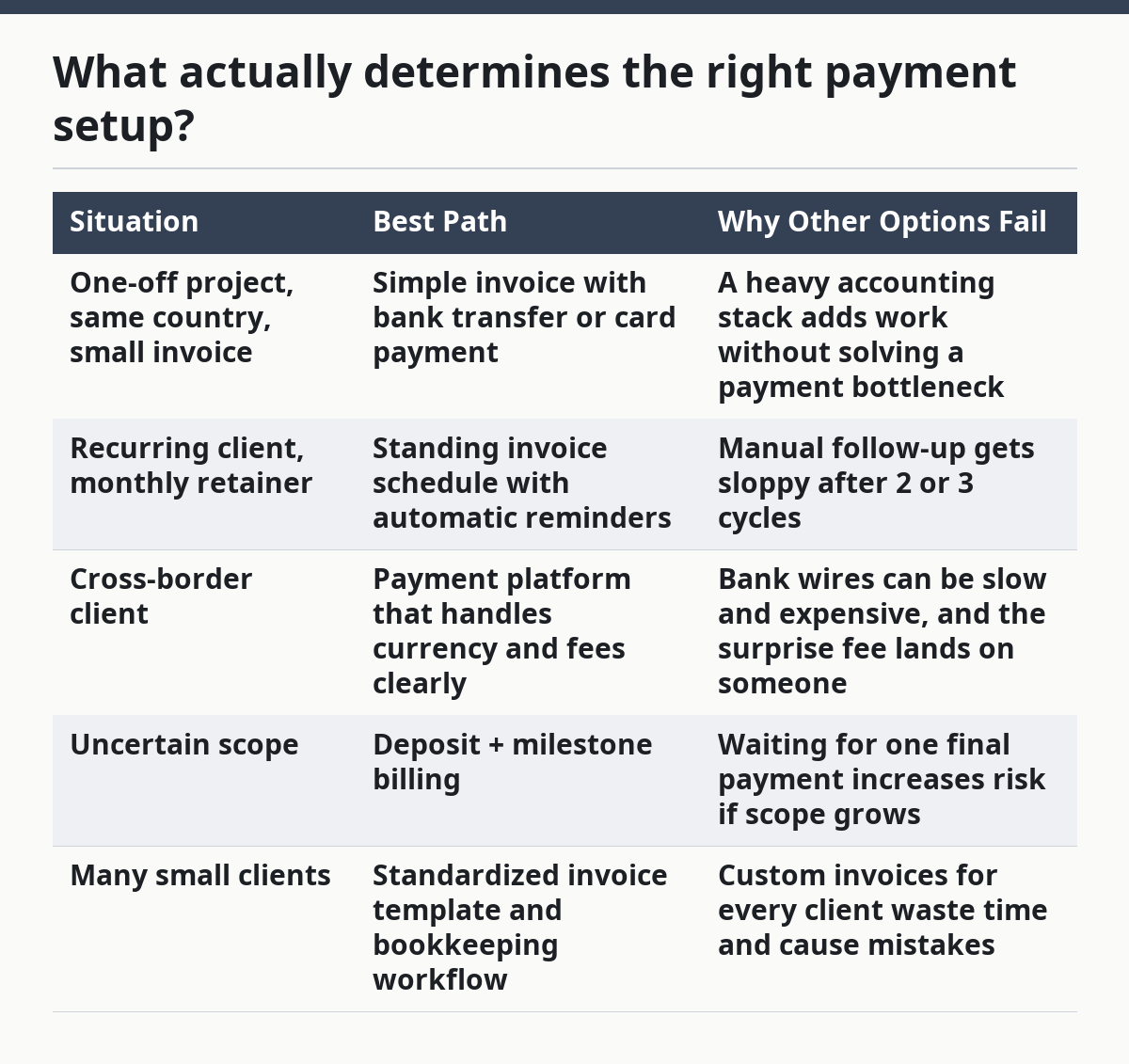
Use this table to choose the path that fits the real job, not the one that sounds tidy.
| Situation | Best Path | Why Other Options Fail |
|---|---|---|
| One-off project, same country, small invoice | Simple invoice with bank transfer or card payment | A heavy accounting stack adds work without solving a payment bottleneck |
| Recurring client, monthly retainer | Standing invoice schedule with automatic reminders | Manual follow-up gets sloppy after 2 or 3 cycles |
| Cross-border client | Payment platform that handles currency and fees clearly | Bank wires can be slow and expensive, and the surprise fee lands on someone |
| Uncertain scope | Deposit + milestone billing | Waiting for one final payment increases risk if scope grows |
| Many small clients | Standardized invoice template and bookkeeping workflow | Custom invoices for every client waste time and cause mistakes |
Here’s the catch: the most useful setup is rarely “the cheapest app.” It’s the one that lets you see who owes money, what work is still open, and which invoices are late within 5 minutes.
Set these 5 things first
- Business bank account: Keep freelancing money out of personal spending. Even a basic business checking account makes reconciliation easier.
- Invoice template: Include your business name, client name, invoice number, due date, scope line, and payment instructions.
- Payment method: Pick one primary method, such as bank transfer, Stripe, Wise, PayPal, or direct card processing.
- Tracking sheet or ledger: Record invoice date, due date, paid date, amount, currency, and fee.
- Tax bucket: Move a set share of each payment into a separate savings account as soon as cash lands.
The truth is, you do not need fancy software on day one. You do need a repeatable 10-minute process that works every time.
Quick check: If you can’t tell at a glance who owes you money, your payment setup is too loose.
How should a freelancer set up operations from day one?
You should set up operations as a simple pipeline: lead, quote, contract, work, invoice, collect, reconcile, file. That order stops most payment confusion before it starts in Freelancer business operations and payments. If you skip one step, the gap usually shows up later as a late invoice or a tax mess.
Picture this: you’re juggling three clients, one deposit, one revision round, and a tax deadline at the end of the quarter. The fix is not “work harder.” It’s a process that turns each project into the same sequence every time, so nothing gets lost in email.
Start with the basics below, then tighten them as volume grows.
- Use one intake form. Ask for name, company, billing address, email, project scope, and desired start date.
- Quote before work. Put the scope in writing, even for a $300 job. A short PDF is enough.
- Sign a contract or statement of work. Include deliverables, revision limits, ownership terms, due dates, and late-payment terms.
- Set the payment trigger. Decide whether you invoice upfront, on delivery, on milestones, or on a 30-day schedule.
- Send the invoice the same day. The longer you wait, the more likely it gets buried.
- Record payment status. Use a spreadsheet or accounting tool to mark unpaid, pending, partially paid, and paid.
- Reconcile weekly. Match bank deposits to invoices once a week, not once a quarter.
A lot of freelancers think operations are “admin.” They’re not. They’re the guardrails that keep scope creep, missed invoices, and tax panic from eating your time. If you bill clients in Net 15 or Net 30 terms, this process matters even more because the cash delay becomes part of your business model.
Tools that fit this workflow include FreshBooks, QuickBooks Online, Xero, Wave, and a plain spreadsheet if you’re still small. The right pick depends on how many invoices you send each month and whether you need expense tracking, VAT/GST handling, or multi-currency support. For more on invoicing basics, see the IRS guidance on recordkeeping and invoicing at https://www.irs.gov/businesses/small-businesses-self-employed/recordkeeping.
On the flip side, do not use five tools for one job unless you have to. A quote in one app, invoices in another, and expenses in a third can create duplicate records and missed payments.
Quick check: If one client project takes more than a few minutes to move from quote to invoice, your workflow has too many gaps.
What payment terms should you put in writing?
You should put due date, late fee policy, deposit amount, milestone schedule, and accepted payment methods in writing before work begins. That is the cleanest way to reduce payment disputes in Freelancer business operations and payments. If you wait until the invoice stage, you’re already negotiating from a weaker position.
Picture this: a client likes your work, but they pay in 45 days by habit and want “one last tweak” before releasing funds. The answer depends on what you agreed to before the first draft left your desk. Terms written in plain language beat a polite reminder thread every time.
Use terms that match the project type.
- Deposits: Common on custom work. A 25% to 50% deposit is often used to reserve time and reduce no-shows, though the exact split should fit your market and risk.
- Milestones: Best for longer projects. Break the work into stages with separate approval and invoice points.
- Retainers: Best when the client needs ongoing access. Define the number of hours, response time, and rollover rules.
- Net terms: Useful for established clients, especially agencies and B2B buyers. Net 15 and Net 30 are common, but the longer the term, the more cash-flow pressure you carry.
- Upfront payment: Best for digital products, short audits, or small fixed-scope jobs.
Here’s where freelancers get burned: they agree to “pay on approval” and then wait while three people inside the client company debate one comma. Use a date-based term instead. “Due upon receipt” is sharper than “when approved,” because approval can drift.
If you charge late fees, make the rule visible in the contract and invoice. If you don’t want to charge late fees, say that too, but keep the due date firm. The real risk is vagueness, not kindness.
Quick check: If you can’t answer “when is this paid?” in one sentence, your terms are too soft.
Freelancer business operations and payments: how do you actually get paid on time?
You get paid on time by making payment easy, reminders predictable, and your invoice hard to ignore. The client should know the amount, the due date, and the next step without opening three tabs. If payment requires a scavenger hunt, it will slip.
Picture this: you’ve sent the invoice and now you’re waiting. The best move is usually not a daily “just checking in” email. It’s a set reminder sequence tied to specific dates, so follow-up feels professional instead of reactive.
Use this workflow.
- Invoice immediately. Send it the same day the work is delivered or the milestone is approved.
- Use a clear subject line. “Invoice #1042 Due March 15” is better than “Payment request.”
- Offer 1 or 2 payment methods max. Too many options slow decisions and make reconciliation harder.
- Schedule reminders. Send one reminder 3 days before due date, one on the due date, and one 7 days after if unpaid.
- Escalate after 14 days. Pause new work or pause final deliverables until the invoice clears, if your contract allows it.
- Track every touchpoint. Note dates, replies, and promises in your ledger or CRM.
Bank transfer is often the cheapest route for domestic clients, though that depends on the bank, the country, and the fee schedule. Stripe is useful for card payments and subscriptions. Wise can help with cross-border transfers and transparent currency conversion. PayPal is familiar to many clients, though fees and disputes can be a pain point. The best option often depends on where the client sits and how often you invoice.
A generic article would tell you to “just use PayPal.” That’s lazy advice. If the client is a business that pays by bank transfer and wants an invoice with VAT details, a bank transfer may be better. If the client is a startup founder in another country, Wise or Stripe may be simpler. If you need recurring billing, a recurring invoice tool matters more than the logo on the payment button. For payment-method guidance, the European Central Bank’s statistics on payment habits and the UK HMRC guidance on invoicing and VAT basics are useful references: https://www.ecb.europa.eu/stats/ecb_surveys/space/html/index.en.html and https://www.gov.uk/vat-record-keeping.
A useful rule: the more friction in payment, the more you should front-load terms and reminders. Don’t wait until the invoice is 20 days late to build a process.
Quick check: If you’ve already had one late payment this quarter, your reminder system needs a schedule, not goodwill.
Which tools are worth using, and which are overkill?
The right tools are the ones that reduce manual work without forcing you into a bigger system than your business needs. If you’re solo and just starting, one invoice tool and one bookkeeping record may be enough. If you have multiple recurring clients, paid ads, subcontractors, or international payments, you need more structure in Freelancer business operations and payments.
Picture this: you open a dashboard and need to know three things fast — who owes you money, what tax you owe, and which expenses can be claimed. The tool set should answer those in under a minute. If it can’t, it’s not earning its place.
Here’s a practical split.
- Invoice-only stage: Wave, Zoho Invoice, or a template in Google Docs plus a spreadsheet.
- Small business stage: FreshBooks, QuickBooks Online, or Xero for invoices, expenses, and bank feeds.
- Cross-border stage: Wise for transfers, plus accounting software that handles multiple currencies.
- Recurring billing stage: Stripe Billing or similar recurring payment tools.
- Expense capture stage: A receipt app with bank sync and mobile upload.
A lot of freelancers overspend on software because the monthly fee feels small. The issue is not the fee alone; it’s the time lost maintaining tools you don’t need. If you send five invoices a month, a heavy ERP-style setup is a bad fit. If you send 50 invoices a month, a spreadsheet becomes a liability.
Use the table below to decide.
| Situation | Best Path | Why Other Options Fail |
|---|---|---|
| 1 to 5 clients, simple billing | Spreadsheet plus invoice template | Subscription software can cost more time than it saves |
| 5 to 20 invoices monthly | FreshBooks, Wave, Zoho Invoice, or QuickBooks Online | Manual tracking starts to break under small errors |
| International clients | Wise, Stripe, or another multi-currency payment tool | Domestic bank tools often hide fees or delay settlement |
| Retainer work | Recurring invoices with auto-reminders | One-off invoicing creates missed cycles |
| Tax-heavy setup | Accounting software with receipt capture and bank feeds | End-of-year cleanup gets ugly fast |
The more efficient path is usually to upgrade in steps. Start simple, then add only the feature that solves the next real problem.
Quick check: If your current app does three jobs badly, switch to one tool that does one job well.
What does cash flow management look like for freelancers?
Cash flow management means you know how much money is coming in, when it lands, and what bills it has to cover before you spend it. If that sounds basic, good — most freelancers fail here, not on income, but on timing.
Picture this: two clients pay late in the same month, your software renewals hit on the 1st, and your tax bill lands before the next deposit clears. That’s not an income problem. That’s a timing problem. The fix is a cash buffer and a payment calendar.
Build the system around dates, not hope.
- Make a monthly cash calendar. Mark invoice due dates, subscriptions, rent, contractor pay, tax deadlines, and loan payments.
- Hold a tax reserve. Move part of each payment into a separate account the same day money arrives.
- Keep a runway. Try to keep at least one month of essential business costs on hand if your income swings.
- Shorten payment terms when possible. Net 15 is easier on cash flow than Net 30, and upfront deposits help even more.
- Review aged receivables weekly. Anything past due should be visible, not buried.
If you rely on one or two large clients, this matters even more. One late invoice can distort the whole month. In that case, ask for milestones, partial upfront payment, or shorter due dates. If you work with many small clients, fast invoicing and simple payment links may matter more than fancy terms.
Tax timing matters too. In many places, self-employed people owe income tax and sometimes sales tax, VAT, GST, or equivalent charges on a schedule that doesn’t match client payments. That means the money can arrive after you already owe it. A local accountant or tax professional can help with the rules in your country, because tax treatment changes by jurisdiction. Check the local tax authority and, if needed, consult a qualified accountant or tax adviser before you choose how to report deposits, reimbursements, or VAT/GST. For example, see the IRS self-employed tax center at https://www.irs.gov/businesses/small-businesses-self-employed and the UK government tax recordkeeping guidance at https://www.gov.uk/self-assessment-tax-returns.
A sloppy cash flow system looks fine until one month goes wrong. Then it gets expensive.
Quick check: If you’re using next month’s income to cover this month’s bills, your cash flow needs a buffer, not a pep talk.
What are the edge cases that break the normal advice?
The normal advice breaks when the client, the contract, or the payment route changes the risk. If you’re in a standard local project, simple terms work. If any of the scenarios below apply, you need to adjust the process.
Picture this: the basic system is in place, but the job has one weird twist that changes everything. That twist is usually currency, scope, or authority to approve payment.
- The client is overseas. Currency conversion, bank fees, and slower settlement change the math. Use a platform that shows the fee before payment, and name the invoice currency clearly.
- The project has scope creep risk. Fixed-price billing can fail fast here. Use milestones or a change-order process with written approval.
- The client is a large company. Procurement and accounts payable may need a vendor form, tax form, or purchase order number before they can pay. Ask for these upfront.
- You subcontract part of the work. Your own cash flow now depends on two payment schedules. Pay subcontractors only after your terms and client receipts are mapped out.
- The client wants net 60 or net 90. That can be normal in some industries, but it shifts financing risk onto you. If you accept it, price for the delay or ask for a deposit.
- You bill in multiple currencies. Exchange rates can make a “paid” invoice worth less than expected. Track the invoice currency, settlement currency, and fee separately.
Here’s what to do instead in each case.
- Overseas client → use Wise, Stripe, or another tool that makes currency visible before acceptance.
- Scope creep → define change requests and bill extra work before doing it.
- Large company → get the billing requirements before the first milestone.
- Subcontractors → set payment dates that do not depend on a hoped-for client deposit.
- Net 60 or net 90 → shorten scope, raise price, or split the work into smaller billable stages.
- Multi-currency billing → reconcile on the settlement amount, not just the invoice amount.
The truth is, edge cases are where freelancers lose margin. If you spot one early, the fix is much cheaper than recovering from a late payment or a bad exchange rate.
Quick check: If the payment path needs more than a standard invoice, treat it as a special case from the start.
How do taxes and records fit into payments?
Taxes and records fit into payments by turning each invoice into a paper trail you can trust later. If you don’t record the sale, fee, and deposit date, you’ll spend end-of-year time reconstructing basic facts from email.
Picture this: the money is in your account, but you can’t remember whether it was for design work, consulting, or a reimbursed expense. That’s the problem records solve. They are not busywork; they are memory with dates attached.
Keep these records for each job:
- invoice number
- client name
- issue date
- due date
- paid date
- payment method
- fee charged by the processor
- invoice currency and settlement currency
- project category
- reimbursed expenses, if any
Use a separate line for reimbursable costs. Don’t bury them in the main fee unless your agreement says to bundle them. If you bought stock assets, travel, or software for the client, keep the receipt and note whether the cost was billed back.
A basic bookkeeping tool can handle this, but a spreadsheet can work if the volume is low. The key is consistency. If every invoice has a different naming style, tax time gets slower and more error-prone.
For tax rules, check the local tax authority in your country and, if needed, a qualified accountant. The exact treatment of deposits, sales tax, VAT, or GST changes by location and business structure. Don’t guess at that part.
The real win is not “better records” in the abstract. It’s fewer surprises when the tax deadline shows up.
Quick check: If you had to explain every payment to a tax office tomorrow, would your records hold up?
FAQ
What is the simplest payment system for a new freelancer?
A simple invoice template, one bank account, and a spreadsheet is enough for many new freelancers. Add one payment method, like bank transfer or PayPal, and keep the process the same for every client.
Should I take a deposit before starting work?
Yes, for custom work, a deposit is often the safest default. It reduces no-shows and protects your time if the scope changes early.
Is it better to charge hourly or fixed price?
Hourly billing is easier when the scope is unclear and revisions are likely. Fixed price works better when the task is well defined and the deliverables are easy to name.
How late can a client be before I pause work?
Pause work when your contract says you can, or sooner if the missed payment puts your cash flow at risk. A clear due date and reminder system work better than waiting until the delay becomes a pattern.
Do I need accounting software right away?
Not always. If you have a few clients and low volume, a spreadsheet and invoice tool may be enough for a while. Switch when manual tracking starts causing missed invoices, tax stress, or payment confusion.
Drafted with AI; not yet reviewed by a person.