
Last updated: November 19, 2026
A failed payment can stop a project midstream, and freelancers need a clear failed payment workflow fast. The fix is a short retry window, a clean invoice status change, and a payment method update path. The steps below show what to do, what to avoid, and when retry logic stops helping. In How Freelancers Handle Failed Payments and Retry Logic, the quick answer is to mark the invoice unpaid until the charge clears, retry only in a narrow window, and move to a new payment method after repeated failures.
What a failed payment means in a freelance workflow
A failed payment in How Freelancers Handle Failed Payments and Retry Logic means the charge did not settle, so the invoice is still unpaid even if the work is done. That can happen with a declined card, an expired card, a bank block, or a processor check that rejects the charge on the first pass.
The job is not to chase the money in a panic. The job is to keep the invoice state clear, retry only when the reason makes sense, and move the payor toward a fresh payment method if the card keeps failing.
Key Takeaways
- Treat the invoice as unpaid until the charge clears; if you need legal, accounting, or tax guidance, consult a professional and check your processor’s documentation.
- Retry logic should be tied to the failure reason, not done on autopilot.
- A clean status label keeps the whole billing trail readable.
- After repeated failures, ask for a new payment method instead of burning time on the same card.
Here’s the catch: “failed” does not always mean “ignored.” Sometimes the card issuer blocks a charge for a simple reason like a daily limit or a security check. Sometimes it means the card is dead.
A basic workflow usually has four states:
- Pending
- Failed
- Retry scheduled
- Paid or replaced payment method
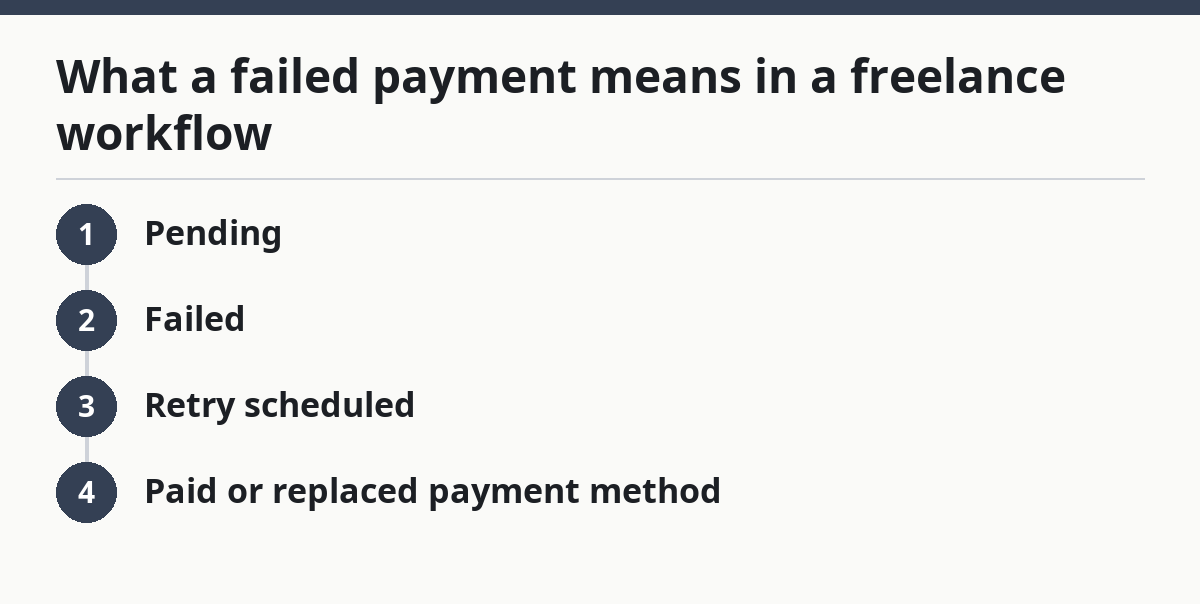
That small status chain matters because it keeps the next step obvious. If the invoice system only says “unpaid,” you lose the reason for the next action.
How do freelancers retry a failed payment?
Freelancers retry a failed payment by using a set schedule, checking the failure reason first, and stopping after a small number of attempts. The best retry logic is usually measured in hours and days, not in guesswork.
Picture this: you open your billing app and see a card decline on a $750 invoice. You do not fire off five retries in 10 minutes. You check the failure code, wait long enough for a temporary issue to clear, then try again or move to a new method.
A practical retry process looks like this:
- Read the decline reason. If the gateway gives a code, use it. A “do not honor” style decline needs a different response than an expired card.
- Wait before the next attempt. A short pause of 24 hours is common when the issue may be temporary, such as a network or issuer block.
- Retry once with the same card. If the issue may have been temporary, one controlled retry is enough to test it.
- Stop after a small set of attempts. After 2 to 3 tries, repeated charges usually create noise, not progress.
- Switch the path. Ask for a new card, ACH, bank transfer, or another approved method.
- Log the result. Keep the invoice status, date, and reason in the record so the next person who touches it knows what happened.
The first retry is about signal, not pressure. If the second attempt fails with the same reason, the odds are good that a third charge on the same card will not help.
A few tools make this easier. Many payment systems let you set smart retry logic so the gateway tries again after a delay instead of hammering the card immediately. Stripe Billing, for example, documents dunning and retry rules in its billing tools, and Chargebee and Paddle publish similar retry options for subscription-style billing. For general payment troubleshooting language, the card networks’ decline guidance and processor help pages are worth reading. See Stripe Billing documentation at https://stripe.com/docs/billing, Chargebee docs at https://www.chargebee.com/docs/, Paddle docs at https://developer.paddle.com/, and Visa’s issuer guidance at https://usa.visa.com.
On the flip side, there is a bad habit: retrying the same charge every few minutes. That can clutter logs, annoy the payer, and make the issue look more serious than it is.
What should the invoice status say after a decline?
The invoice status should say failed, past due, or payment pending retry so the record matches the actual state of the charge. A vague status causes mistakes later, especially if you hand the file to a bookkeeper, a VA, or a second payment tool.
Picture this: the invoice is marked “sent,” the card fails, and nothing changes in the system. A week later you cannot tell whether the payment was declined once, retried twice, or never touched again. That is how billing gets messy.
Use a status that answers three questions:
- Did the charge go through?
- Is another retry scheduled?
- Does the payer need a new method?
If your invoicing tool supports notes, add the failure reason and the next action. A line like “Declined by issuer — retry scheduled after 24 hours” is far more useful than “follow up later.”
A clean status trail also helps when you use payment reminders. The reminder should match the stage:
- After first failure: a light notice that the payment did not clear
- After scheduled retry fails: a firmer note asking for a corrected card or alternate method
- After repeated failures: a direct request to switch payment method
That matters because reminders are not the same thing as late-payment follow-up. This page is about the payment system itself, not the chase. The message should support the recovery workflow, not replace it.
The best fit for internal coordination is a good status label, because it cuts down on confusion. If you work with a bookkeeper, an assistant, or a finance app, everyone can see the same state without reading a long email trail. For related billing setup guidance, see the hub on freelance billing and client payment systems, and compare it with your invoicing tool’s help center and your processor’s billing docs.
When should a freelancer stop retrying and ask for a new card?
A freelancer should stop retrying and ask for a new payment method after the same card fails 2 or 3 times, or sooner if the decline reason points to a permanent problem. If the card is expired, closed, or reported lost, retries waste time.
Picture this: the first charge fails because the card issuer blocks it. The second fails the same way. The third would likely just repeat the same result. That is the point where a new card beats another retry.
Use this cutoff:
- Expired card: ask for a new method right away
- Lost or closed card: do not retry again
- Soft decline: one delayed retry may make sense
- Repeated issuer block: stop and request a fresh method
The truth is, retry logic works best for temporary problems. It does not fix a dead card. It also does not help when the payer forgot to update billing details after a card replacement.
A good replacement request is short and specific. Ask for the updated card or another approved payment route, and keep the invoice open until the new method is entered. If the platform supports it, let the payer update the card in the account instead of sending full card details by email. For more context, Stripe and Chargebee both describe saved-payment-method updates in their billing docs, while Paddle documents subscription payment updates in its developer guides.
A lot of freelancers wait too long here because they hope the same card will “just work” on the next try. That delay costs time, and it can make the ledger look cleaner than it really is.
How payment reminders fit into failed payment handling
Payment reminders fit in after a failed charge as a system message, not as a long negotiation. The reminder should point to the failed payment, the retry status, and the next required action in plain language.
Picture this: a charge fails at 9 a.m., and the payer never sees the error in the app. A reminder sent later that day can close that gap. It tells them the card did not work and shows them what to fix.
The reminder sequence is usually simple:
- First notice: “Your payment didn’t go through.”
- Second notice: “We retried the card and it still failed.”
- Third notice: “Please update your payment method.”
Each note should stay tied to the invoice status. Do not send a generic “just checking in” line when the issue is a failed charge. The user needs a direct path back to the payment screen.
You also want the wording to stay aligned with the billing workflow. This is a billing workflow, not a dispute. A clear notice can say the charge failed, ask for a new method if needed, and point to the invoice ID or date.
A cleaner process helps when you use recurring billing. Many systems let you pair reminders with retry logic so the failure message and the second attempt happen in the same flow. That keeps the recovery loop short. For example, Stripe Billing, Chargebee, and Paddle each document dunning or subscription retry settings in their product docs.
If you use an invoicing tool, make sure the reminder references the same invoice number and the current status. Mismatched numbers create support work nobody wants.
What a recovery workflow looks like from start to finish
A recovery workflow turns a single decline into a controlled process: detect, retry, notify, switch method, close the loop. That is the whole job, and it should fit on one page of notes.
Picture this: the invoice fails on Monday, the system retries on Tuesday, and the payer updates the card on Wednesday. By Thursday, the invoice is paid and the record shows exactly how it got there.
A simple recovery flow looks like this:
- Detect the failed charge. The payment processor flags the decline immediately or on the next sync.
- Set the invoice status. Mark it failed or retry pending so the record is honest.
- Check the decline reason. Permanent problem or temporary problem?
- Schedule the retry. Use a delay that makes sense for the failure type, often 24 hours for a soft decline.
- Send a payment reminder. Keep it short and tied to the invoice.
- Stop after repeated failure. After 2 to 3 attempts, ask for a new method.
- Close the loop. Once paid, mark the invoice paid and store the failure notes.
That workflow is boring on purpose. Boring is good in billing. It keeps you from improvising each time a card fails.
A generic article often misses the part that matters most: failed payments are a systems problem, not just a communication problem. If the retry logic, invoice status, and reminder text do not match, the process breaks even when the work is excellent.
For related billing setup guidance, the hub on freelance billing and client payment systems is the right place to go next, alongside processor docs and invoicing guides that explain saved cards, retries, and dunning.
Common mistakes that make failed payments worse
The most common mistakes are retrying too fast, hiding the failure in a vague status, and sending the wrong kind of reminder. Those mistakes waste time and make a clean fix harder.
Picture this: the payment fails at noon, you retry at 12:05, and then again at 12:12. The card still fails, but now the trail is noisy and the payer has three different failure moments to sort out.
Watch for these problems:
- Too many quick retries. Cost: wasted processor calls and cluttered logs. Better move: wait and test once.
- No status update. Cost: nobody knows whether the invoice is active, failed, or waiting. Better move: change the invoice state right away.
- Ignoring decline reason. Cost: you retry an expired card as if it were temporary. Better move: read the error code first.
- Using a broad reminder. Cost: the payer sees a generic note and misses the fix. Better move: ask for a new method or corrected card.
- No cutoff point. Cost: the same card gets charged over and over. Better move: stop after 2 to 3 attempts.
One more mistake shows up with recurring work: assuming every failed payment should be treated the same. A one-off project, a retainer, and a subscription-style invoice can each need a slightly different retry pattern; if you are unsure, consult a professional and check the processor’s retry guidance.
The simplest rule is still usually the best one: if the card keeps failing after a small, planned retry window, stop pushing that card and move to a fresh payment method.
What should freelancers do when a client payment fails?
Freelancers should mark the invoice as failed, check the decline reason, and run one planned retry before asking for a new payment method. The cleanest response is a short workflow, not a long back-and-forth. If the card fails again after 2 or 3 tries, stop retrying and switch to another approved method.
How many times should a payment be retried?
A payment should usually be retried 2 to 3 times at most, with time between attempts. One retry after about 24 hours can make sense for a temporary issuer block or a brief processor issue. Repeating the same charge many times usually adds noise without fixing the problem.
When should a freelancer ask for a new payment method?
A freelancer should ask for a new payment method as soon as the decline looks permanent, such as an expired, closed, or lost card. It also makes sense after repeated failed retries on the same card. At that point, a fresh method is faster than another charge attempt.
Drafted with AI; not yet reviewed by a person.