
Last updated: November 20, 2026
A clean project closeout means the client gets final files, clear handoff notes, and a tidy archive before the thread goes cold. The easiest way to do it is with a project closeout checklist that covers delivery, sign-off, storage, and one last follow-up email.
Key takeaways
- Final delivery is more than sending a file dump; it includes labels, notes, and the format the client can use right away.
- A handoff email does the most work when it lists what is inside the delivery, what the client still needs to do, and where the files live.
- An offboarding checklist keeps small misses from becoming unpaid extra work later.
- A project archive matters even when the client is happy, because the next request often shows up weeks or months after the file is sent.
- A clean closeout is not for every job in the same way; a logo job, a copy deck, and a site build need different levels of handoff detail.
What goes in a project closeout checklist?
A project closeout checklist is the shortest way to make sure nothing gets lost at the end of a freelance job. It should cover final files, the handoff email, the archive, and the last follow-up in one place before anything leaves your desk.
Start with the deliverable set. List the exact file names, formats, and versions the client is receiving, such as PDF, DOCX, PNG, or source files. If the client asked for 3 versions, 2 sizes, or a final proof, write that down before you send anything.
Then add handoff notes. These are the small details that make the files usable: which version is final, what was changed in the last round, and whether any asset needs a license key, font access, or export setting. A one-page checklist beats a vague memory every time.
Finish with the admin side of the closeout. Note where the project archive lives, who has access, and whether the client has been told how long they can expect support for simple follow-up questions. That part saves time when the same files resurface later.
How do I hand off final files to a client?
I hand off final files by sending one clean package, one clear note, and one obvious next step. The package should be easy to open in under 2 minutes, and the note should tell the client exactly what they received and what to do next.
Use this order:
- Name the files in the project folder before sending them so the client sees final versions first.
- Export the deliverables in the format the client actually needs, such as PDF for review or source files for future edits.
- Compress the folder into a single .zip if there are multiple files, so the handoff stays together.
- Upload the package to the agreed cloud folder or transfer link so the client can reach it without hunting through email.
- Send the handoff email with the delivery link, a short summary, and any next steps the client needs to take.
The main goal is clarity, not volume. If the client asked for 5 final images, do not bury them under draft versions, old exports, or mixed naming like final_final2. A handoff that looks messy creates doubt, and doubt creates more email.
A good handoff email usually includes the project name, the file list, the delivery link, and one line that says whether anything else is pending. Keep it simple enough that a busy client can skim it in less than a minute.
| Delivery choice | Best for | Risk if handled badly |
|---|---|---|
| Email attachment | Small files and simple sign-off | File size limits and broken threads |
| Cloud folder link | Multiple files and versioned work | Confusion if access is not set correctly |
| ZIP package | Bundled final files | Hidden files or unclear naming |
| Shared document link | Copy decks, notes, or editable text | Wrong permission settings |
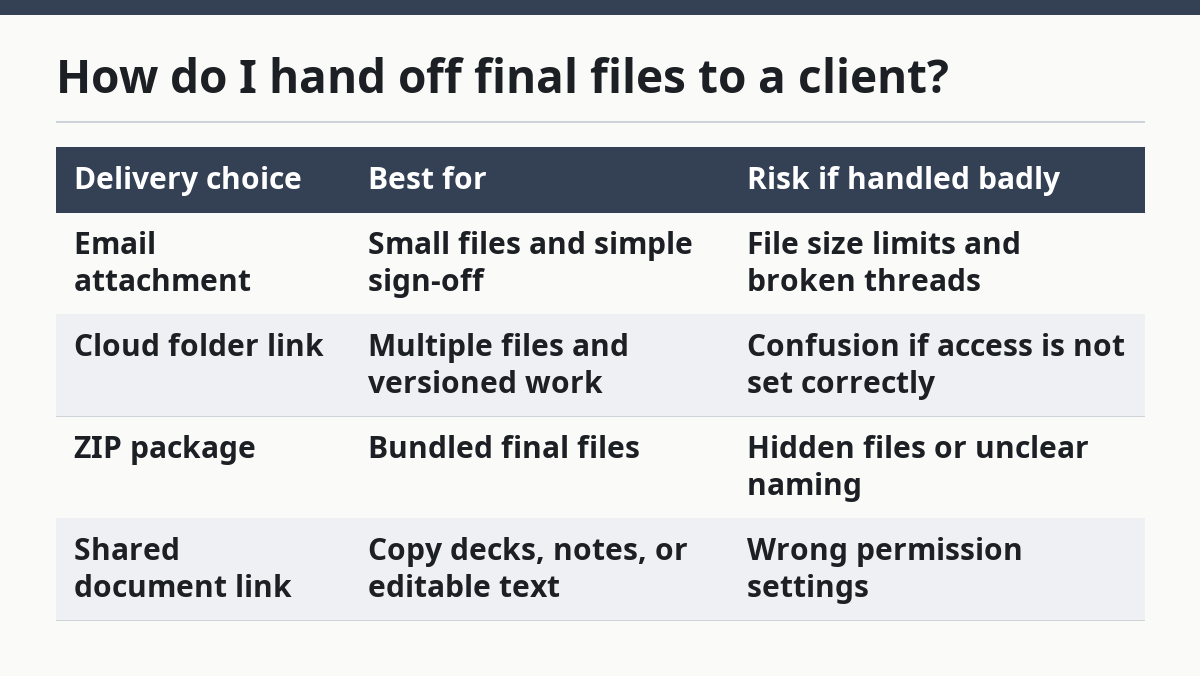
If the work includes editable source files, say so plainly in the handoff email. If it does not, say that too. Clients get frustrated when they assume a file type is included and find out later that the only file they have is a flattened export.
For file sharing basics, the help pages from Google Drive and Microsoft Support are useful references for access and link settings. Adobe’s support pages are also worth checking when the handoff includes PDFs or Acrobat files.
What should be in the handoff email?
The handoff email should tell the client what they got, where it is, and what happens next. It is the last message that turns the work into something they can use without asking follow-up questions.
A clean handoff email has four parts. First, a short subject line that names the project and signals final delivery. Second, a one-paragraph summary of the deliverables. Third, a link or attachment list. Fourth, a brief note about any open items, such as final approval, a missing asset, or a future revision path.
Do not make the email pull double duty as a project diary. If the client needs to know why a design changed, put that in the notes file or the archive folder, not in a long chain of scattered messages. A final email with 6 bullet points is easier to scan than a wall of text.
This is also the right place to set expectations for the closeout window. If you want the client to review the delivery within 3 business days, say that in plain language. If the work is done and no response is needed unless there is a problem, say that too.
A lot of freelancers stop after “files attached.” That is too thin for real closeout. The client then has to guess which version is final, which file to open first, and whether the job is actually complete.
How do I archive a finished project?
A project archive keeps the work available without leaving it active on your desk. It should hold the final files, the key notes, and the record of what was sent, all in one place that you can find again in under a minute.
Use a simple archive pattern that separates final output from working material. One folder can hold the final deliverables, another can hold notes, and a third can hold old drafts or reference files. That way the client’s final package does not get mixed with half-finished versions or stray exports.
The archive should also include the handoff email text, the date the delivery went out, and any permission notes for shared assets. If the project included fonts, stock art, or login access, record the source and the access limits so you know what can be reused later.
A project archive is not the same thing as a junk drawer. If everything lands in one pile, the next file hunt becomes slower, and the risk of sending the wrong version goes up. A clean archive is the difference between a 2-minute lookup and a 20-minute scramble.
This is where the project closeout checklist earns its keep. It turns a finished job into a file set that still makes sense after the details fade from memory.
What mistakes cause a messy closeout?
The most common closeout mistakes are wrong file names, missing source files, unclear permissions, and no follow-up note. Each one costs time later, usually when the client needs a fix and the old thread no longer tells the full story.
A vague file name is the easiest problem to prevent. final.pdf means nothing once there are 3 versions in the same folder, while ClientName_Brochure_Final_v3.pdf gives the client a clue about what they are opening. The difference matters when the client shares the file with another person.
Missing source files create a second kind of problem. If the client expects editable files and gets only a PDF, the handoff feels incomplete. If they do not need editable files, sending them anyway can raise questions about what they are paying to keep.
Permissions cause their own mess. A shared folder with expired access or a link that only works for the owner leads to avoidable back-and-forth. If the delivery depends on a login, spell that out in the handoff email before the client clicks the link.
The last mistake is skipping the follow-up note. Even a short message like “The final files are in the folder, and the project is now closed” helps set the end point. Without that line, some clients keep treating the job like it is still open.
When is a project actually done?
A project is actually done when the final files are delivered, the client has the handoff note, and the archive is saved. If there is one last approval step, that approval is part of the closeout, not an informal afterthought.
This matters because “done” can mean different things on different jobs. A simple writing project may end once the final DOCX is sent, while a design project may need source files, a PDF proof, and a folder of exported assets. The closeout checklist keeps those cases from getting blurred together.
A project is not done if the client still needs a key file, a password, or a link that expires before they can download the work. It is also not done if the files are sent but the archive is empty, because the next revision becomes harder to manage.
This is the point where a clean closeout protects both sides. The client knows what they received, and the freelancer knows the job no longer needs active attention. That reduces drift, which is how old projects keep haunting new ones.
What should I do after a project ends?
After a project ends, I send the archive to the right place, mark the job closed, and keep the follow-up window short and clear. The next step is not more work on the project; it is making sure the ending is documented.
A practical after-project routine takes about 10 minutes. Save the final handoff email, store the archive, and note any outstanding issue that the client asked to revisit later. If there is a future phase, record it as a new job instead of leaving the old one half-open.
This is also the time to remove temporary access that should not stay live, such as shared folders, review links, or draft-only permissions. If the client still needs access to the final files, leave that intact and close only the parts that were meant to be temporary.
The point is to finish cleanly, not to disappear. A tidy ending makes the next project easier, especially when the same client returns with a related brief months later.
If this sits inside the larger freelancer client onboarding and delivery hub, the closeout process belongs at the end of the same workflow that started with the first client handoff.
What should a freelance project closeout include?
A freelance project closeout should include the final files, a handoff email, an archive, and a simple record of what was delivered. It should also note any next step the client still owes, such as approval or access to a shared folder.
The best closeout uses a checklist, not memory. That makes the ending repeatable, which matters when a client comes back later and asks for the same format again.
How do I hand off final files to a client?
I hand off final files by sending them in the format the client asked for, with clear file names and one short email that explains what is inside. If there are several files, I keep them in one folder or ZIP package so nothing gets split across threads.
The safest handoff is the one the client can open without guessing. A clean delivery link, a clear label, and a short note usually do more than a long explanation.
What should I do after a project ends?
After a project ends, I save the final package, store the handoff note, and close out the working files so the job is easy to find later. If the client may need support again, I note the follow-up window in the archive instead of leaving it in email limbo.
A finished project should be easy to reopen from the archive and easy to leave behind until then. That balance is what makes the closeout feel clean instead of rushed.
Drafted with AI; not yet reviewed by a person.